Digital Image Processing - An Overview
Building the future of machine vision, one pixel at a time.
Why Process Images?
Three primary motivations:
- Improvement of pictorial information for human interpretation (Enhancement).
- Processing of image data for storage, transmission, and representation (Compression).
- Autonomous machine perception (Computer Vision).
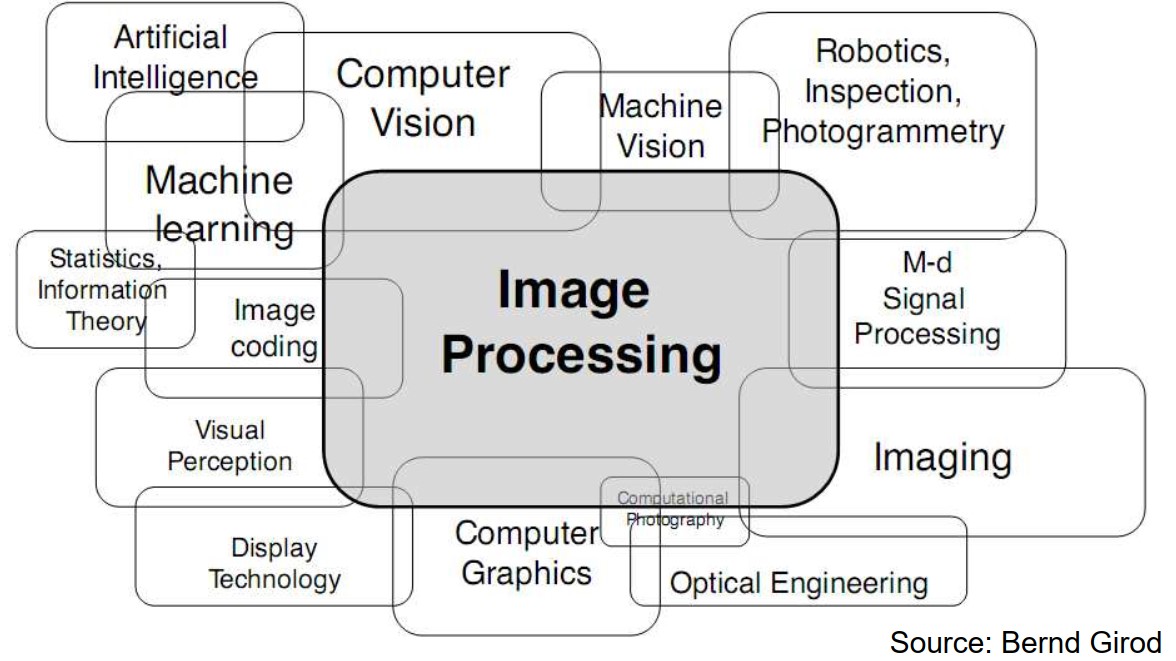
DIP vs. Computer Vision vs. Graphics
Where does Image Processing fit in the pipeline of visual computing?
| Field | Input | Output | Goal |
|---|---|---|---|
| Image Processing | Image | Image | Enhancement, Restoration, Transformation. |
| Computer Vision | Image | Data/Description | Object recognition, scene understanding. |
| Computer Graphics | Models/Data | Image | Rendering, synthesizing visual data. |
Sources of Images
Most images are generated by the Electromagnetic (EM) Spectrum:
- Gamma-ray imaging (Nuclear medicine)
- X-ray imaging (Medical diagnostics)
- Ultraviolet imaging (Fluorescence microscopy)
- Visible & Infrared (Standard photography, Remote sensing)
- Microwave & Radio (Radar, Astronomy)
The 10 Fundamental Steps of DIP
Modern image processing follows a structured lifecycle to turn raw sensor data into meaningful information.
- Acquisition - Capturing the raw signal using CMOS/CCD sensors.
- Enhancement - Subjective improvements (Contrast, Sharpness).
- Restoration - Objective cleanup based on degradation models.
- Color Processing - Converting between spaces (RGB, HSV, CMYK, YCbCr).
- Wavelets - Multi-resolution analysis for compression/denoising.
- Compression - Reducing data redundancy (JPEG, PNG, WebP).
- Morphological - Shape analysis (Erosion, Dilation, Skeletonization).
- Segmentation - Partitioning the image into constituent objects.
- Representation - Extracting descriptors (textures, boundaries, shapes).
- Recognition - Labeling objects based on extracted descriptors.
Real-World Engineering Applications
- Medical: MRI/CT Scan enhancement and tumor segmentation.
- Remote Sensing: Satellite data processing for weather and urban planning.
- Industry: Automated visual inspection on assembly lines.
- Biometrics: Face, iris, and fingerprint recognition.
- Space: Processing noise-heavy signals from deep space telescopes.
Ranah penerapan Pemrosesan Citra Digital
Apa itu Citra Digital?
Citra dapat didefinisikan sebagai fungsi dua dimensi f(x, y):
- x, y: Koordinat spasial pada bidang 2D.
- Amplitude f: Intensitas cahaya (brightness) pada koordinat tersebut.
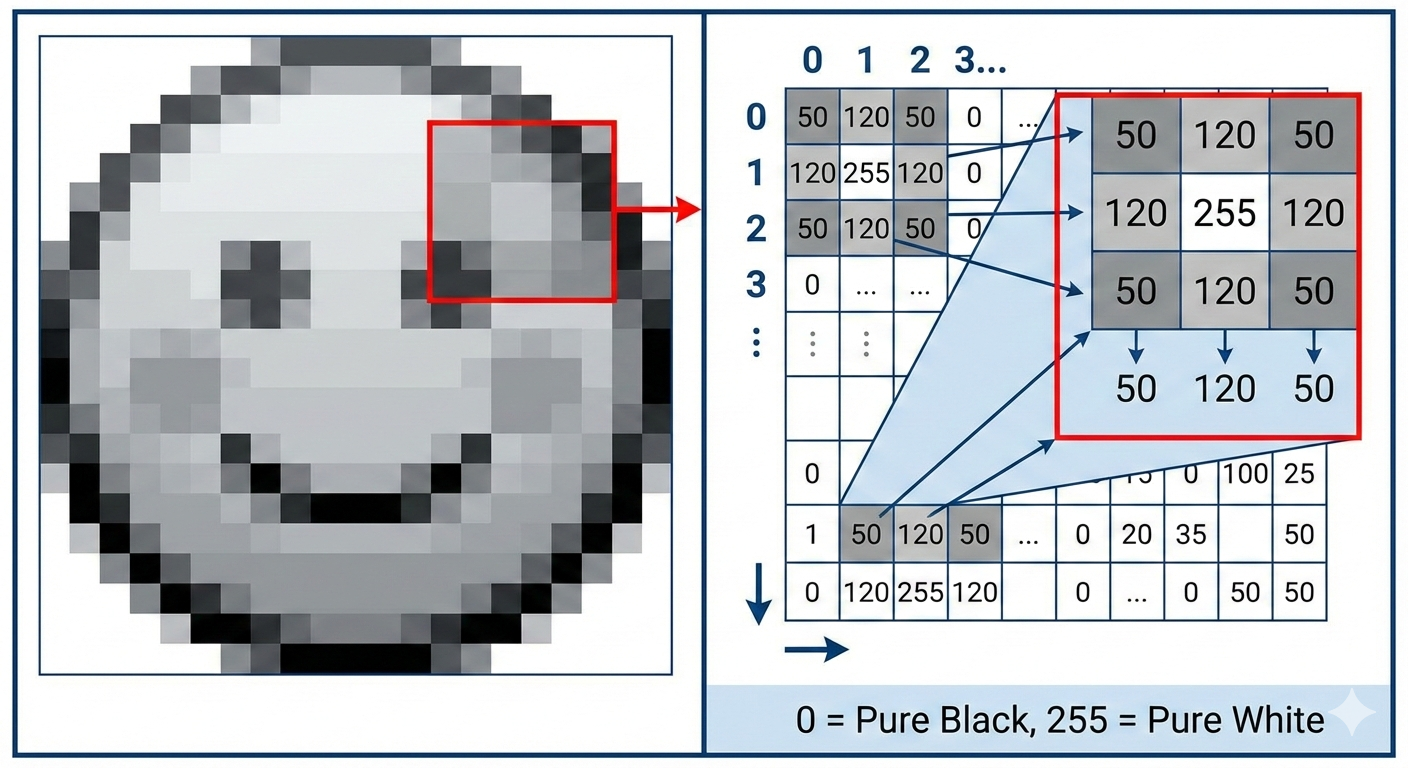
A digital image is represented mathematically as a 2D array or matrix. Each element in this matrix is called a pixel (picture element), and its value corresponds to the intensity or color at that specific spatial location.
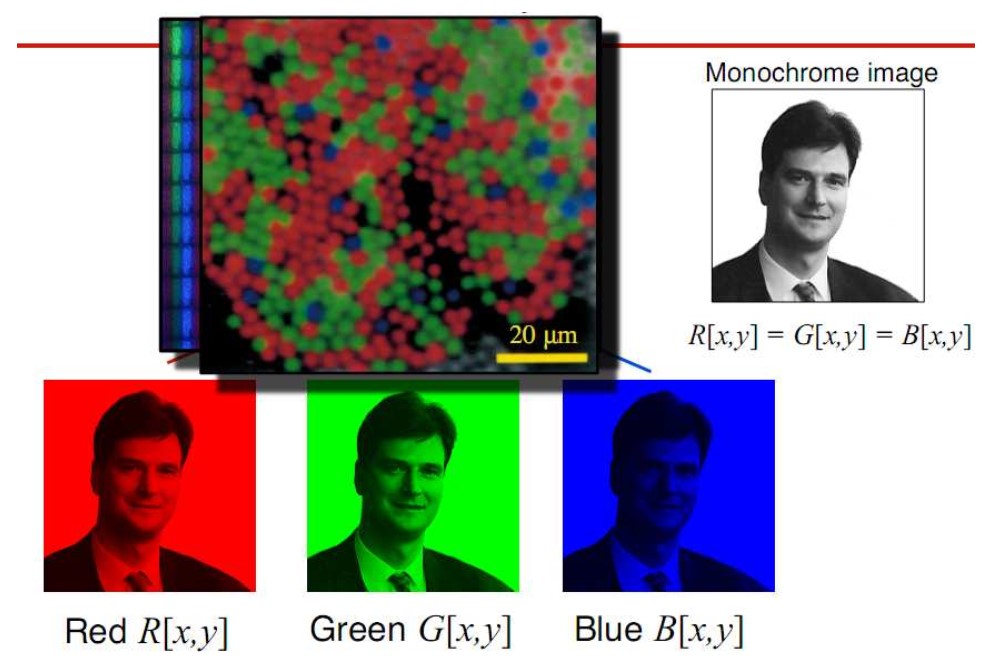
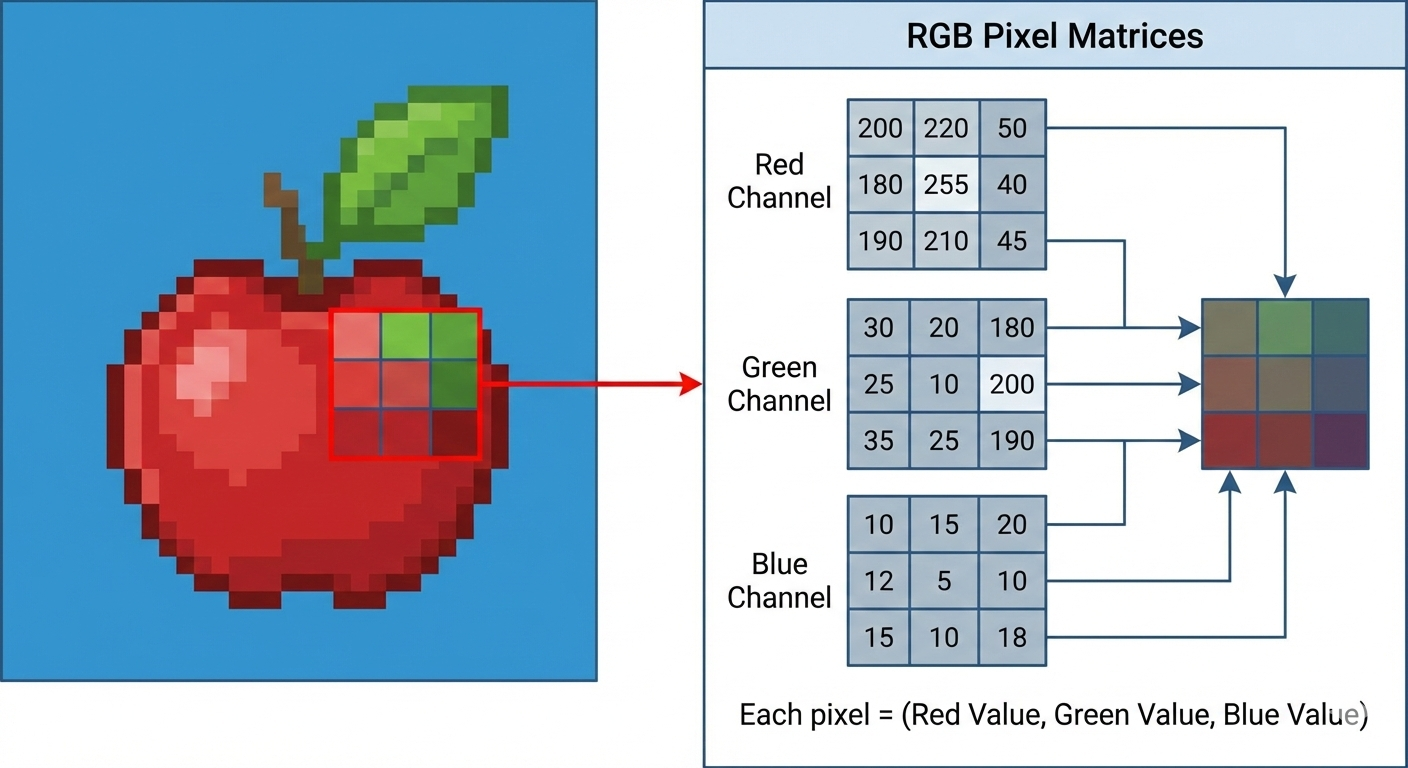
In a grayscale image, each pixel is typically represented by a single value (e.g., 0 for black, 255 for white in an 8-bit system). In a color image, each pixel is usually a vector of three values, such as Red, Green, and Blue (RGB).
The coordinates of the matrix are usually denoted as (x,y), where y represents the row and x represents the column. The origin (0,0) is typically located at the top-left corner of the image. When a computer processes an image, it is essentially performing mathematical operations on this grid of numbers.
Sistem Penglihatan Manusia
Membahas bagaimana mata manusia bekerja sebagai inspirasi sensor kamera digital.
Pemahaman tentang persepsi kecerahan dan kontras sangat penting dalam mendesain algoritma enhancement.
- Retina: Tempat jatuhnya bayangan (seperti sensor CMOS).
- Cones & Rods: Sel peka cahaya untuk warna dan kecerahan.
The human vision system is an incredibly complex biological "imaging" system. In the context of computer science and digital image processing, we study it because it provides the blueprint for how we design digital cameras and algorithms.
1. The Anatomy of the Eye
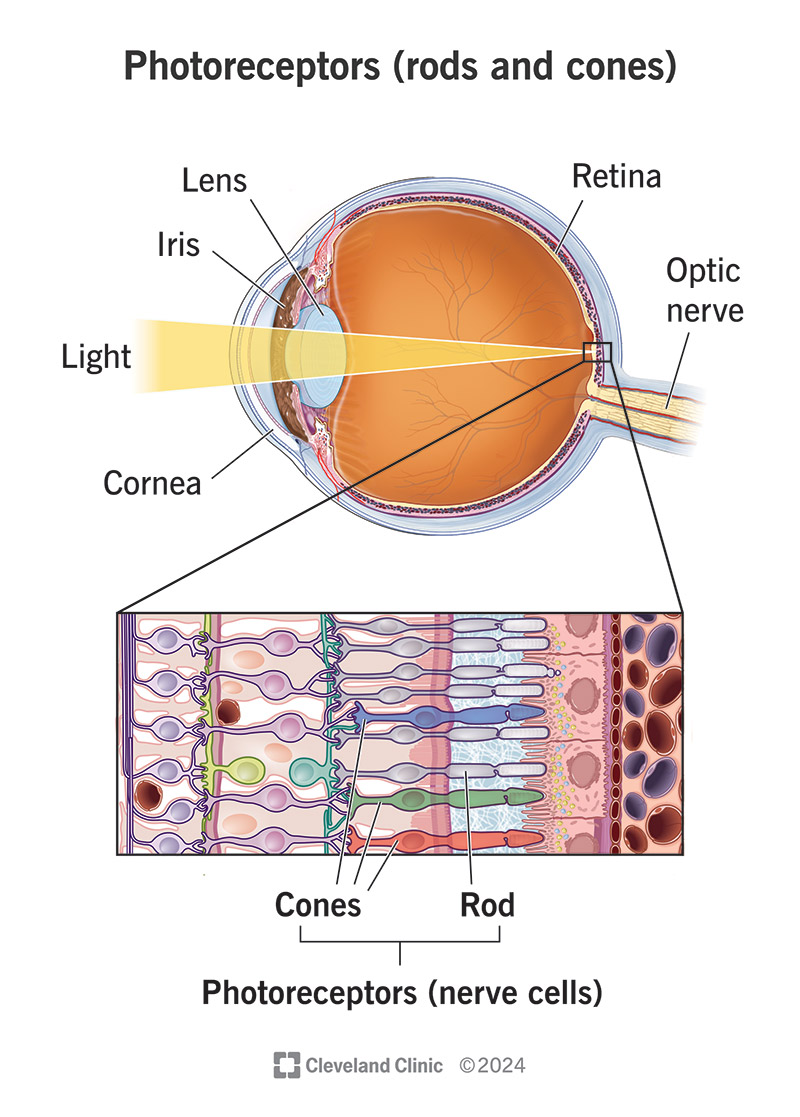
Think of the eye as a biological camera. Light enters through the **cornea** and **lens**, which focus the image onto the back of the eye.
- Cornea and Lens: These act as the optics, focusing light onto the retina. The lens can change shape (accommodation) to focus on objects at different distances.
- Iris: Acts like an aperture, controlling the amount of light entering the eye through the pupil.
- Retina: This is the biological equivalent of a digital sensor (CMOS/CCD). It is a thin layer of light-sensitive tissue where the image is formed.
2. The Biological Sensors: Rods and Cones
The retina is lined with two primary types of photoreceptors that convert light energy into electrical impulses:
- Cones (Detail and Color): There are about 6 to 7 million cones, primarily concentrated in a small central area called the fovea. Cones are responsible for high-resolution vision and color perception. They are less sensitive to light, which is why we struggle to see colors in very dark environments.
- Rods (Motion and Low Light): There are about 75 to 150 million rods distributed across the rest of the retina. They are highly sensitive to light but provide low-resolution, "black and white" vision. They are primarily used for night vision and detecting peripheral motion.
3. Key Perceptual Phenomena
The way we perceive an image is often different from the physical reality of the light hitting our eyes. This is critical in Image Processing because a "mathematically perfect" image might look wrong to a human.
- Brightness Adaptation: The human eye cannot see the full range of light intensities (from deep shadows to bright sunlight) simultaneously. Instead, it adjusts its overall sensitivity to a specific range. This is why you are momentarily blinded when walking from a dark theater into bright sunlight.
- Simultaneous Contrast: Our perception of the brightness of an object depends on its background. A gray square will look lighter against a black background and darker against a white background, even if the gray value is identical.
- Mach Bands: This is an optical illusion where the eye overshoots/undershoots the intensity at the boundary of two different gray levels, making edges appear sharper than they actually are. This is a natural "edge enhancement" built into our biology.
4. From Eye to Brain
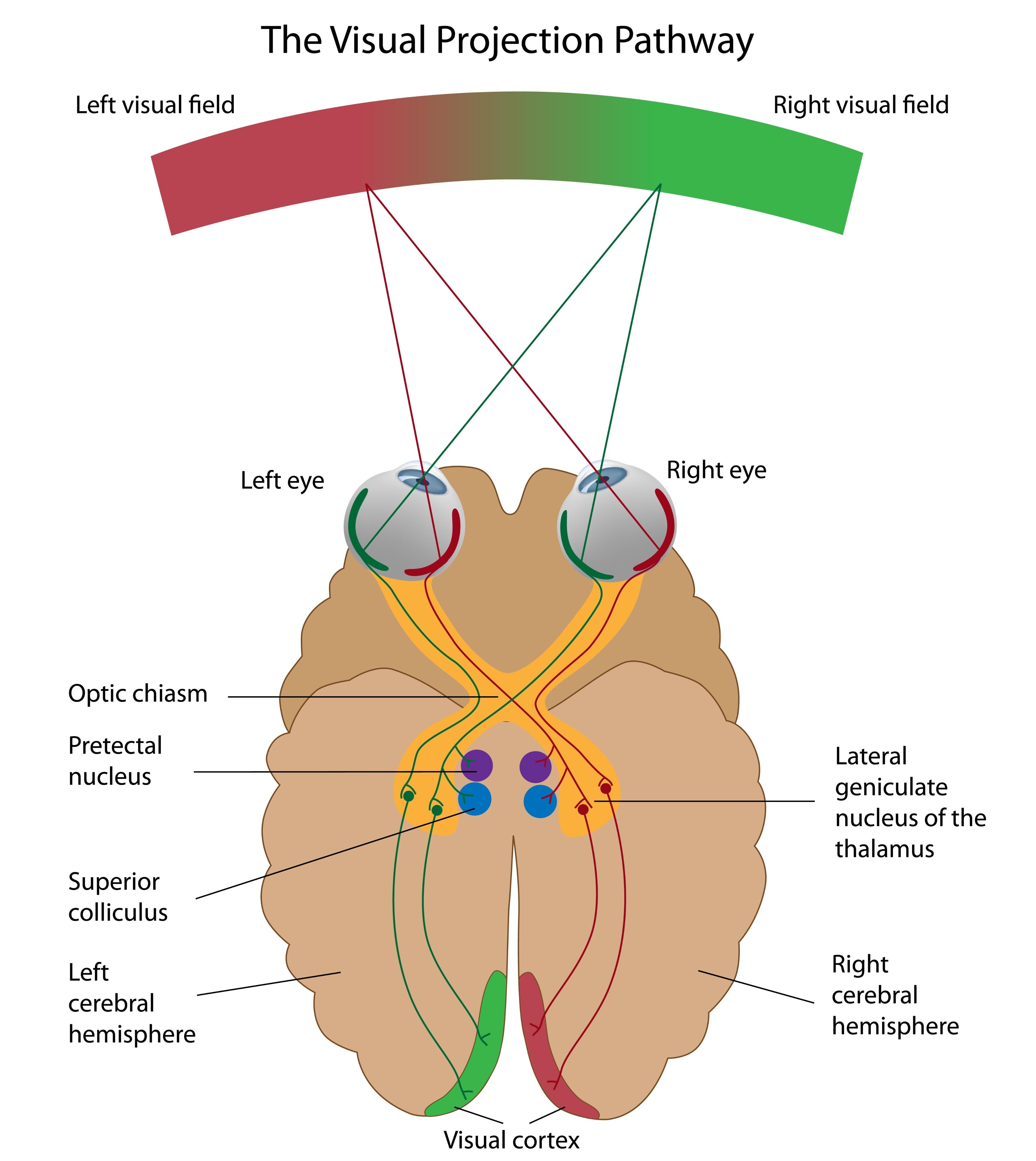
The electrical signals generated by the retina travel via the optic nerve to the visual cortex in the brain. Interestingly, there is a "blind spot" in each eye where the optic nerve exits the retina (because there are no photoreceptors there), but our brain uses the data from the other eye and visual memory to "fill in" the gap so we never notice it.
Akuisisi Citra
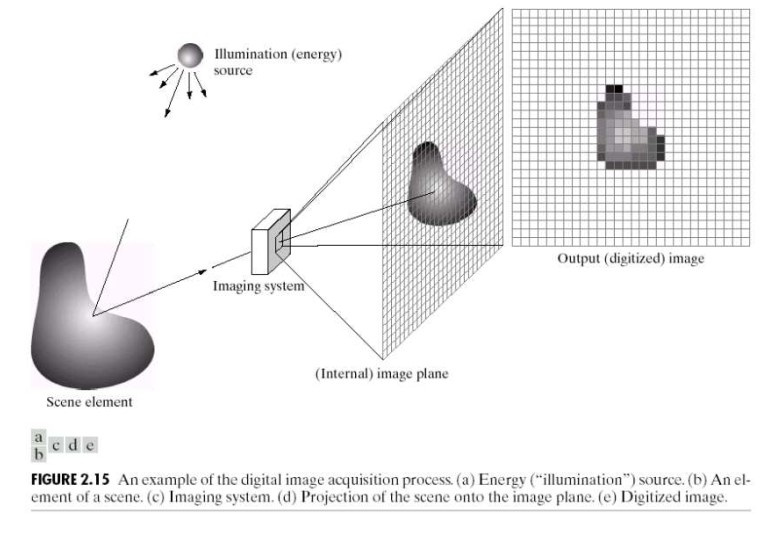
Proses menangkap citra fisik menjadi representasi digital melibatkan:
- Sensing: Sensor (CCD/CMOS) menangkap energi iluminasi.
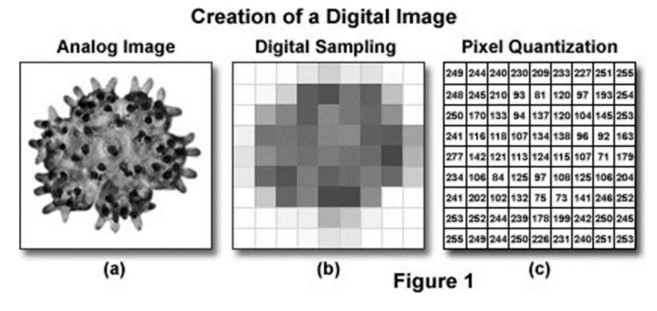
- Sampling: Digitalisasi koordinat spasial.
- Quantization: Digitalisasi nilai amplitudo (intensitas).
Akuisisi citra (Image Acquisition) adalah langkah paling fundamental dalam Pemrosesan Citra Digital. Tanpa langkah ini, tidak ada data yang bisa diolah. Secara sederhana, ini adalah proses mengubah pemandangan fisik (dunia nyata/analog) menjadi data digital (angka) yang bisa dipahami komputer.

1. Model Dasar Akuisisi Citra
Proses ini membutuhkan tiga elemen utama agar sebuah gambar dapat terbentuk:
- Sumber Energi (Illumination): Biasanya berupa cahaya (matahari atau lampu), tetapi bisa juga gelombang elektromagnetik lain seperti Sinar-X atau Radar. Energi ini "menyinari" objek.
- Pemandangan/Objek (Scene): Benda yang memantulkan atau meneruskan energi tersebut.
- Sistem Pencitraan (Imaging System): Gabungan antara optik (lensa) dan sensor yang menangkap energi pantulan tersebut.
2. Sensor: Jantung Akuisisi
Sensor berfungsi mengubah energi cahaya (foton) menjadi sinyal listrik (elektron) melalui prinsip Efek Fotolistrik. Sinyal keluaran dari sensor ini masih berupa sinyal analog (tegangan kontinu).
Ada tiga jenis susunan sensor yang umum digunakan:
- Sensor Tunggal (Single Sensor): Hanya satu fotodioda. Untuk membuat gambar 2D, sensor atau objeknya harus bergerak (seperti pada mesin drum scanner lama).
- Sensor Garis (Line/Strip Sensor): Deretan sensor dalam satu baris. Bergerak menyapu dokumen baris demi baris (digunakan pada Scanner Flatbed dan mesin Fotokopi).
- Sensor Array: Grid sensor 2D (matriks) yang menangkap seluruh gambar sekaligus. Ini yang ada di kamera HP dan DSLR Anda (CCD atau CMOS).
3. Digitalisasi: Mengubah Analog ke Digital
Sinyal tegangan yang keluar dari sensor bersifat kontinu (halus). Agar menjadi citra digital, sinyal ini harus dipecah menjadi angka-angka diskrit melalui dua tahap krusial:
A. Sampling (Pencuplikan Spasial)
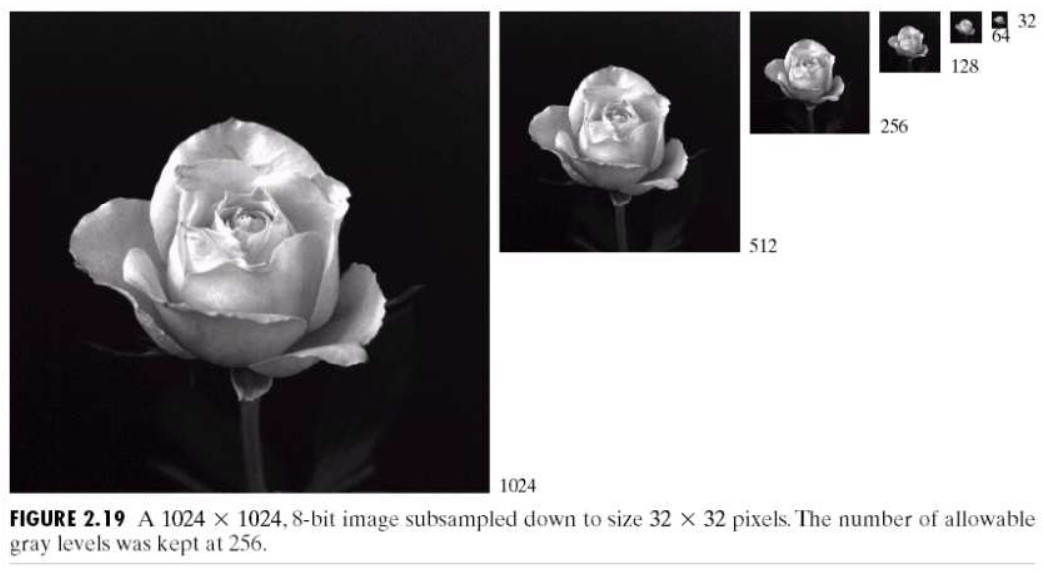
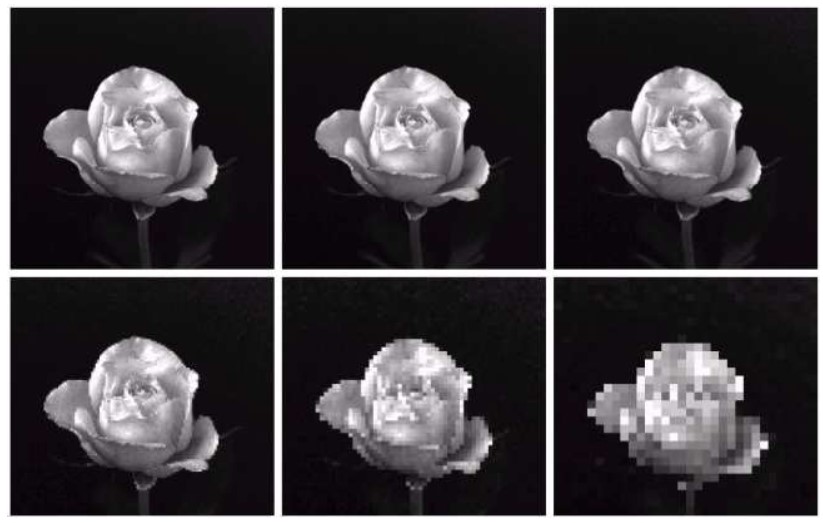
Sampling adalah proses membagi gambar menjadi kisi-kisi (grid) koordinat fisik.
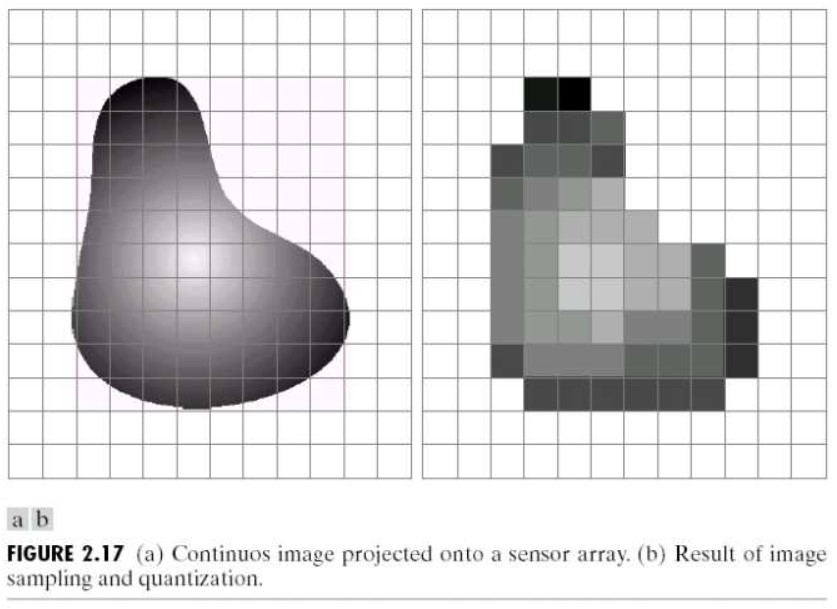
- Bayangkan Anda meletakkan jaring di atas sebuah foto.
- Kita mengambil nilai hanya pada titik tengah setiap kotak jaring tersebut.
- Hasil: Proses ini menentukan Resolusi Spasial (misalnya 1920 1080 piksel).
- Catatan: Jika sampling terlalu sedikit (Undersampling), gambar akan terlihat pecah atau kotak-kotak ("pixelated").
B. Kuantisasi (Diskritasi Amplitudo/Warna)
Setelah mendapatkan satu titik sampel, kita harus mengukur seberapa terang titik tersebut. Karena intensitas cahaya di dunia nyata tak terbatas, kita harus memetakannya ke dalam skala terbatas (integer).
- Contoh: Pada citra 8-bit, nilai intensitas dipaksa menjadi angka bulat antara 0 (Hitam) hingga 255 (Putih).
- Hasil:Proses ini menentukan Resolusi Warna (Bit-Depth).
- Catatan:Jika level kuantisasi terlalu sedikit, transisi warna yang halus akan terlihat patah-patah (disebut False Contouring).
4. Hasil Akhir: Matriks Citra
Setelah melalui Sampling dan Kuantisasi, gambar bukan lagi objek fisik, melainkan sebuah matriks matematika f(x,y):
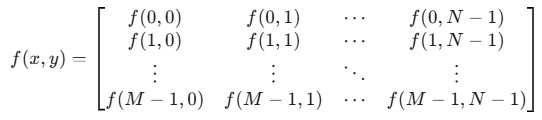
Dimana:
x adalah koordinat baris (posisi vertikal).
y adalah koordinat kolom (posisi horizontal).
Nilai f di dalam kotak adalah intensitas piksel (misal: 128 untuk abu-abu).
Catatan: Beberapa penulis buku dan artikel ilmiah lebih suka menggunakan x sebagai kolom dan y sebagai baris sebagaimana lazimnya koordinat kartesian, sedangkan beberapa penulis lainnya lebih suka menggunakan f(r,c) sebagai notasi pada rumus operasi untuk menghindari permasalahan penyebutan ini.